Disclosure: This post contains affiliate links. If you buy through them, I may earn a commission at no extra cost to you.
This Kit review answers one question most new creators ask: is the free plan enough, or do you need to pay from day one? Kit, the email platform formerly called ConvertKit, now lets you build a list of up to 10,000 subscribers for free. That is unusually generous. However, the free plan leaves out the feature many creators sign up for, namely automated email sequences.
Below, I walk through every plan, what the free tier really covers, how Kit’s visual automations work, what selling through Kit costs, and what UK and EU creators should know about GDPR. All prices come from Kit’s official pricing page, checked on 22 October 2026.
✔ Key takeaways
- Kit’s free plan covers up to 10,000 subscribers, unlimited landing pages, forms and broadcasts, plus tagging and digital product sales.
- Automated email sequences and the visual automation builder start on the Creator plan ($33/month at 1,000 subscribers when I checked).
- Kit charges 3.5% + 30c per sale on every plan, and that figure includes card processing.
- Kit is US-based and certified under the EU-U.S. Data Privacy Framework, including the UK Extension.
- Pick Kit if you are a newsletter-first creator. Pick an all-in-one tool if you also need funnels and courses.
📋 In this guide
- Kit review in 60 seconds
- What is Kit (formerly ConvertKit)?
- Kit plans and pricing in 2026
- Is the Kit free plan enough?
- Visual automations and sequences
- Selling digital products and paid newsletters
- GDPR and data privacy for UK and EU creators
- How to set up Kit in 5 steps
- Pros and cons
- Who should pick something else
- Frequently Asked Questions
- Final verdict
Kit review in 60 seconds
Kit is one of the best email tools for creators who publish a newsletter and sell digital products. Its editor is simple, tagging is flexible, and the free plan is big enough to grow a real audience. You can try Kit for free without a credit card.
The catch is automation. On the free plan you can send broadcasts, but you cannot build a welcome sequence that runs on its own. So, if you want a lead magnet that delivers a five-email onboarding series, you will need Creator. For many creators, that is the moment Kit stops being free.
💡 Quick verdict
Start free while you build your first 500 to 1,000 subscribers and send a weekly newsletter by hand. Upgrade to Creator once you have a lead magnet that needs an automated welcome series.
What is Kit (formerly ConvertKit)?
Kit is an email marketing platform built specifically for creators: bloggers, YouTubers, podcasters, authors, coaches and course creators. It rebranded from ConvertKit to Kit, and its pricing page says it is trusted by more than 550,000 creator businesses.
Unlike a general small-business tool, Kit organises your audience with tags rather than separate lists. As a result, one subscriber can carry tags such as “downloaded checklist”, “bought ebook” and “podcast listener”, and you can email each segment without duplicating contacts. In addition, Kit includes landing pages, opt-in forms, a newsletter feed, a recommendations network and simple commerce.
If you are still choosing your wider stack, my guide to email marketing for small business explains how a list, a lead magnet and a welcome sequence fit together.
Kit plans and pricing in 2026
Kit prices its paid plans by the number of subscribers. The figures below are for a list of 1,000 subscribers, as shown on the official Kit pricing page on 22 October 2026. Bigger lists cost more, so check the slider on that page for your size.
| Plan | Price (1,000 subscribers) | Subscribers | Best for |
|---|---|---|---|
| Free | $0 | Up to 10,000 | New creators building a first list |
| Creator | $33/month, or $390/year billed yearly | Unlimited (price rises with list size) | Creators who need automations and sequences |
| Pro | $66/month (a limited-time offer showed $50/month for the first year) | Unlimited (price rises with list size) | Established newsletters and teams |
| EUR / GBP | Check current pricing | – | Kit showed USD prices only when I checked |
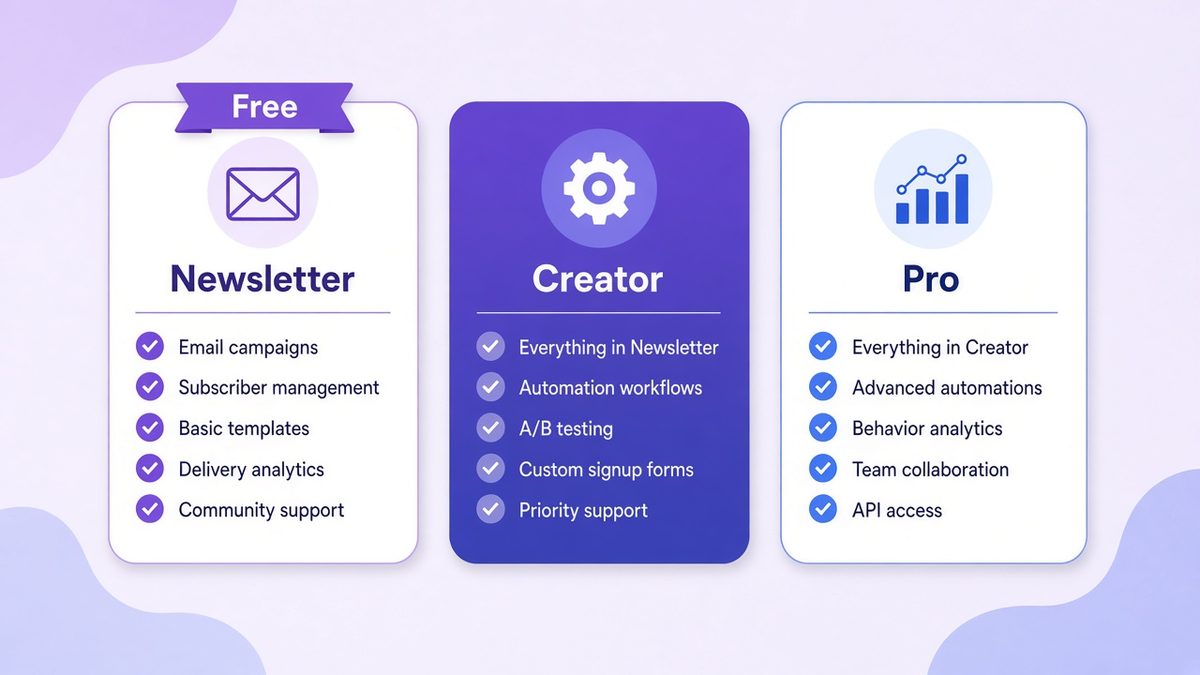
Illustrative overview of the three Kit plans. See the official pricing page for exact, current features.
Paying yearly saves 17%, according to the page. Both paid plans come with a 14-day free trial, and Kit says no credit card is needed to start it. Prices were shown in US dollars only, so UK and EU buyers should check the final amount at checkout, since your bank’s exchange rate and any VAT apply.
Here is how the main features split across plans:
| Feature | Free | Creator | Pro |
|---|---|---|---|
| Landing pages and forms | Unlimited | Unlimited | Unlimited |
| Email broadcasts | Unlimited | Unlimited | Unlimited |
| Tagging and segmentation | Yes | Yes | Yes |
| Automated email sequences | No | Yes | Yes |
| Visual automation builder | No | Unlimited | Unlimited |
| Remove Kit branding | No | Yes | Yes |
| Users | 1 | 2 | Unlimited |
| Sell digital products and subscriptions | Yes | Yes | Yes |
| Transaction fee on sales | 3.5% + 30c | 3.5% + 30c | 3.5% + 30c |
| Support | Product support | 24/7 email and chat | 24/7 priority email and chat |
📌 About the Pro offer
The Pro discount was labelled as a limited-time offer for the first year only, renewing at the standard rate afterwards. Treat the $66/month figure as the normal price and check the page before you buy.
Is the Kit free plan enough?
For many creators, yes, at least for the first few months. The free plan gives you everything you need to collect emails and publish a regular newsletter:
- Up to 10,000 subscribers
- Unlimited landing pages, opt-in forms and email broadcasts
- Audience tagging and segmentation
- The ability to sell digital products and subscriptions
- Free Recommendations, where other Kit creators can recommend your newsletter
- A/B testing of two subject lines
For example, a UK illustrator could build a landing page for a free brush pack, tag everyone who downloads it, and send a fortnightly newsletter with new work. None of that needs a paid plan.
⚠️ What the free plan leaves out
No automated email sequences and no visual automations, Kit branding stays on your pages and emails, and only one user can log in. If your lead magnet needs a follow-up series, or a virtual assistant helps you, budget for Creator.
So the honest answer is this: the Kit free plan is enough for a manual newsletter. It is not enough for an automated funnel.
Visual automations and sequences
Automation is where Kit earns its reputation. On Creator and Pro, you get unlimited visual automations and unlimited email sequences. Moreover, the builder is drag-and-drop: you choose an entry point, such as a form signup or a tag, then add emails, delays, conditions and actions.
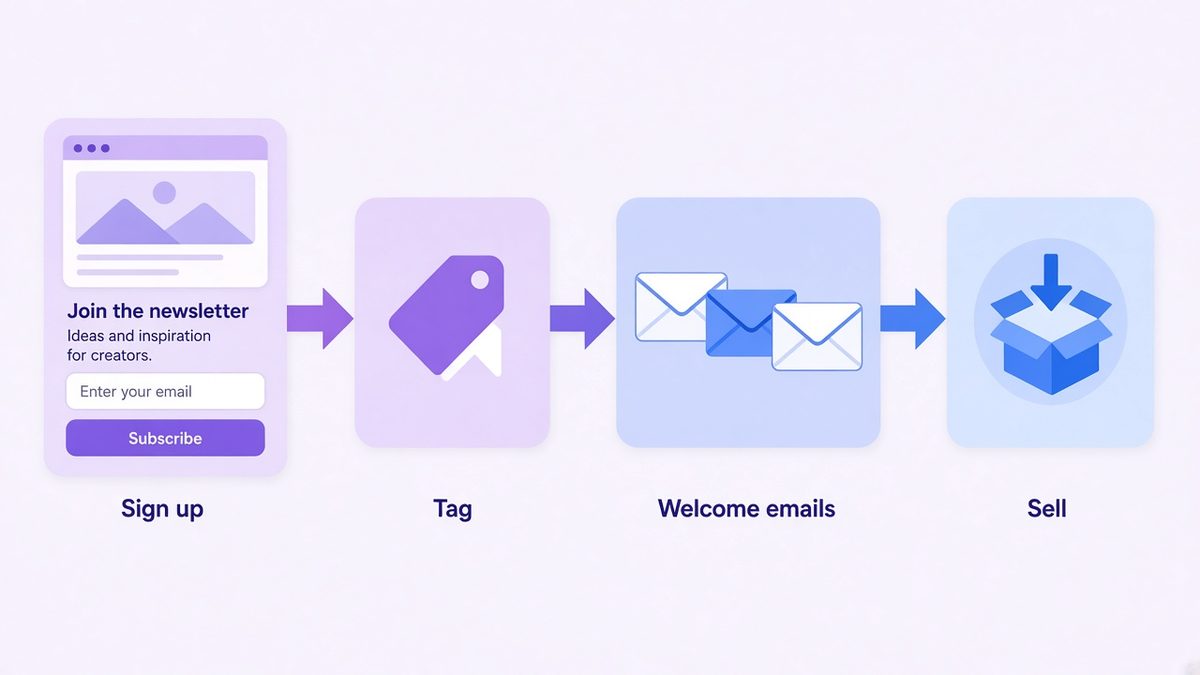
A simple Kit-style visual automation: sign up, tag, welcome emails, then a sales email.
A typical creator funnel looks like this:
Sign up
A visitor joins through a landing page or an embedded form to get your freebie.
Tag
Kit tags the subscriber by entry point, for example “freebie: brush pack”.
Welcome emails
A sequence delivers the freebie, introduces you and shares your best content over a few days.
Sell
After the welcome series, a final email offers a paid product. Buyers get a new tag and leave the sales path.
Kit also includes a visual automation template library on paid plans, so you do not have to start from a blank canvas. Creator adds RSS campaigns, which turn new blog posts into emails automatically, plus more than 100 app integrations through the Kit App Store.
Selling digital products and paid newsletters
Kit lets you sell digital products, run paid newsletters, charge recurring subscriptions and accept tips. Importantly, you can do this on every plan, including Free.
The cost is a transaction fee. Kit’s comparison table lists 3.5% + 30c per sale on all plans, and says this includes credit card processing. On a $29 ebook, that works out to roughly $1.32 per sale. That is fair for occasional sales, although high-volume sellers may prefer a dedicated checkout.
Creator and Pro also unlock Paid Recommendations, where Kit pays you to recommend other newsletters. The table lists a 23.5% Kit fee on those earnings. Pro adds a newsletter referral system through a free SparkLoop plan.
GDPR and data privacy for UK and EU creators
If you collect emails from people in the UK or EU, GDPR applies to you, whichever tool you use. Kit’s privacy policy says it is based in the United States and stores personal information on servers in the US and other countries.
For transfers, Kit states that it complies with the EU-U.S. and Swiss-U.S. Data Privacy Frameworks and the UK Extension to the EU-U.S. Data Privacy Framework. In practice, that gives you a recognised legal basis for sending subscriber data to a US provider.
💡 Your part of GDPR
Use clear consent wording on every form, link your privacy policy, keep a record of how each person signed up, and honour unsubscribes quickly. Kit’s tags make it easy to record the source of consent.
If EU hosting matters more to you, compare an EU-based provider. Systeme.io, for instance, is run by an Irish company, as I explain in my Systeme.io pricing guide.
How to set up Kit in 5 steps
Create a free account
Sign up with your email. You do not need a card for the free plan.
Set your sender details
Add your name, a real postal address (required by anti-spam laws) and ideally your own domain for sending.
Build one landing page
Pick a template, write one clear promise and connect a freebie that Kit delivers automatically.
Plan your tags
Create a few tags for entry points and interests before you import anyone. A simple system now saves hours later.
Send your first broadcast
Welcome your first subscribers manually, then decide whether a Creator trial for sequences is worth it.
Pros and cons
| Pros | Cons |
|---|---|
| Free plan covers up to 10,000 subscribers | No sequences or visual automations on Free |
| Flexible tag-based segmentation | Paid plans get expensive as your list grows |
| Unlimited landing pages and forms on every plan | USD pricing only when I checked |
| Sell products and paid newsletters, even on Free | 3.5% + 30c fee on every sale |
| Strong visual automation builder on paid plans | No built-in course or funnel builder like all-in-one tools |
Who should pick something else
Kit is not the right fit for everyone. If you want sales funnels, a course area and email in one place, an all-in-one tool is usually better value. Systeme.io has a free plan with funnels, courses and email, and you can compare more options in my list of Systeme.io alternatives.
Likewise, if you mainly need landing pages that convert, see my roundup of the best free funnel builders. And if you run a small business rather than a creator brand, a general email tool may suit you better. I compare Kit with one such tool, MailerLite, in a separate guide.
Frequently Asked Questions
Is Kit really free?
Yes. Kit’s pricing page lists a free plan at $0 for up to 10,000 subscribers, with unlimited landing pages, forms and broadcasts. Paid plans add automations and more.
Does the Kit free plan include automations?
No. Automated email sequences and the visual automation builder start on the Creator plan. The free plan supports tagging and manual broadcasts.
How much does Kit cost?
When I checked on 22 October 2026, Creator cost $33 per month and Pro $66 per month for 1,000 subscribers, with 17% off for yearly billing. Prices rise with list size.
What fees does Kit charge on sales?
Kit lists a transaction fee of 3.5% plus 30 cents per sale on all plans, including credit card processing.
Is Kit GDPR compliant?
Kit is US-based and says it complies with the EU-U.S. Data Privacy Framework and its UK Extension. You still need clear consent and a privacy policy on your own forms.
Is Kit the same as ConvertKit?
Yes. ConvertKit rebranded as Kit. The product, accounts and features carried over under the new name.
Final verdict
Overall, Kit is an excellent email platform for creators, and the free plan is genuinely useful for a manual newsletter up to 10,000 subscribers. The real decision comes when you want automation. At that point, Creator is a fair price for a tool built around creators, while all-in-one platforms win if you also need funnels and courses.
My advice: start free, grow your list with one strong freebie, and take the 14-day Creator trial once you are ready to automate your welcome series.
Start your free Kit account
Build your landing page and newsletter for free, then try Creator when you need automations.
Affiliate link. I may earn a commission at no extra cost to you.
Affiliate disclosure: Some links in this post are affiliate links. If you buy through them, I may earn a commission at no extra cost to you. I only recommend tools and books I believe are genuinely useful.