A smooth transition to working from home rarely happens by accident. Moving your job from an office to your kitchen table changes your routine, your focus, how you talk to colleagues and even how you sleep. This guide walks you through nine practical steps, from setting up a proper workspace and keeping your files safe to building a daily schedule, protecting your focus and knowing when to switch off, so remote work feels normal instead of exhausting.
✔ Key takeaways
⏱ About 12 min read · the short version is right here
- Most people struggle with the transition to working from home because the old structure of commuting, colleagues and office hours disappears overnight.
- A dedicated workspace, even a small corner, is the single biggest signal to your brain that it is time to work.
- Plan your day in blocks with a clear start ritual and a clear shut-down routine, or work slowly spreads into your evenings.
- Keep work files in one secure cloud folder with automatic backup, so a broken laptop or spilled coffee never costs you a week of work.
- Over-communicate in writing: share what you are working on, when you are available and when you are offline.
- Review your setup after 30 days and fix the one thing that is draining you most.
📋 In this guide
- Why the move to home working feels hard
- Step 1: Set up a workspace that tells your brain “work”
- Step 2: Get your tech, files and backups right
- Step 3: Build a daily schedule with clear edges
- Step 4: Protect your focus from home distractions
- Step 5: Communicate more than you think you need to
- Step 6: Stay connected so you do not feel isolated
- Step 7: Look after your body and energy
- Step 8: Set boundaries with family and housemates
- Step 9: Review and adjust after 30 days
- Home office costs and tax: US, UK and EU basics
- FAQ
🔍 Updated 14 Nov 2026: rewritten for remote and hybrid workers in the US, UK and Europe. Tax rules change often, so treat the costs section as general information and check GOV.UK, the IRS or your local tax office before you claim anything.
Why the move to home working feels hard
Working from home sounds easy until you try it. In an office, a lot of structure is given to you: a commute that separates home from work, colleagues who notice if you disappear, set lunch breaks and a manager down the corridor. At home, all of that is gone at once, and you have to rebuild it yourself.
Common problems in the first few weeks include working longer hours without noticing, feeling cut off from the team, constant interruptions from family or deliveries, poor posture at a dining table, and a nagging sense that you are never fully at work or fully at home. None of these mean you are bad at remote work. They simply mean your environment and habits have not caught up with the new way of working yet.
📌 Who this guide is for
Employees moving to remote or hybrid roles, freelancers leaving a shared office, and small business owners who now run their company from home. If you manage people who work remotely, read my guide on how to manage a remote team alongside this one.
Step 1: Set up a workspace that tells your brain “work”
Your brain links places with activities. If you answer emails on the sofa where you also watch films, it gets harder to relax there and harder to focus. The first step in any transition to working from home is to create a space that only means work, even if it is small.
You do not need a spare room. A corner of the bedroom with a small desk, a fold-away table by a window or a shelf desk in the hallway can all work. What matters is that you sit in the same place every working day and leave it when you finish.
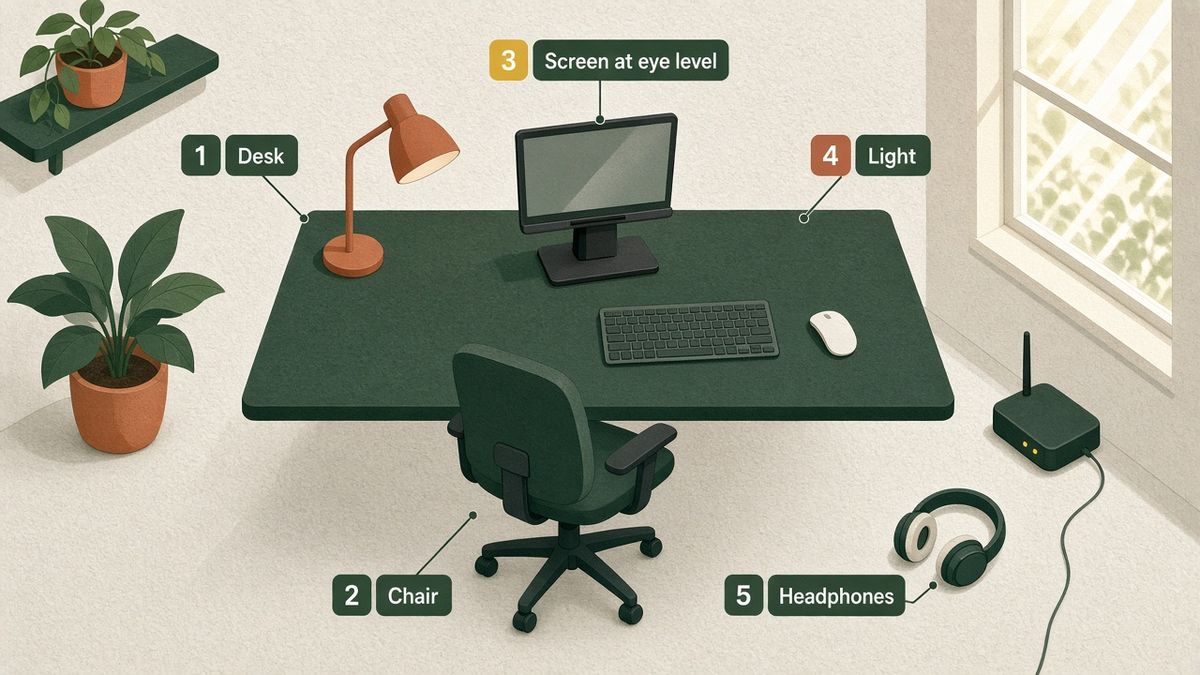
| Item | Why it matters | Budget tip |
|---|---|---|
| Desk at elbow height | Stops shoulder and wrist strain from a dining table that is too high | A simple flat-pack desk or a sturdy table plus a cushion to raise your seat |
| Supportive chair | You may sit for 6 to 8 hours a day, so lower-back support pays off quickly | Check second-hand office furniture sellers; many offices sell chairs cheaply |
| Screen at eye level | A laptop on a desk forces you to look down all day | A laptop stand or a pile of books, plus an external keyboard and mouse |
| Good light | Natural light keeps you alert; a lamp reduces eye strain in the evening | Put the desk side-on to a window to avoid glare on the screen |
| Headphones | Block household noise and make calls clearer for everyone | Wired headphones with a microphone are fine to start with |
💡 Make it portable if space is tight
If you have to work at the kitchen table, keep everything in one box or bag. Unpack it to start the day and pack it away when you finish. The packing itself becomes a mini commute that signals the end of work.
Step 2: Get your tech, files and backups right
Nothing ruins a remote week faster than a laptop that will not connect, a lost file or a video call that keeps freezing. Sort your tech out in the first few days rather than fixing it in a panic later.
Check your internet speed at the times you usually work and, if calls struggle, move closer to the router or use a cable. Learn the tools your team relies on, such as video calls, chat and shared documents, before the important meeting. Turn on automatic updates and a screen lock, and use a password manager so you are not reusing the same password everywhere.
The biggest risk is your files. At home there is no IT team quietly backing up your work, so if your laptop is stolen or dies, everything on it can disappear. Keep your working files in one cloud folder that syncs across your devices and is backed up automatically. If you handle client or customer data, choose a provider that stores data in the region your clients expect; for many European businesses, an EU data location helps with GDPR obligations.
📌 What I use for files and backups
I keep my work files in pCloud, a Swiss cloud storage service where you can choose EU or US data storage and pay once for a lifetime plan instead of a monthly fee. If you want to compare options first, read my pCloud vs Google Drive vs Dropbox comparison or the full list of the best cloud storage for small business.
Pick one home for work files
Create a single “Work” folder in your cloud storage and stop saving to the desktop or random downloads folders.
Turn on automatic sync
Install the desktop and phone apps so the same files are on every device and changes save themselves.
Test a restore
Delete a test file and bring it back from the trash or version history, so you know recovery works before you need it.
Step 3: Build a daily schedule with clear edges
Without a commute and office hours, the day can either drift (you start late and work until 9 pm) or collapse (you get distracted and achieve little). The fix is a schedule with clear edges: a fixed start time, planned blocks and a fixed finish.
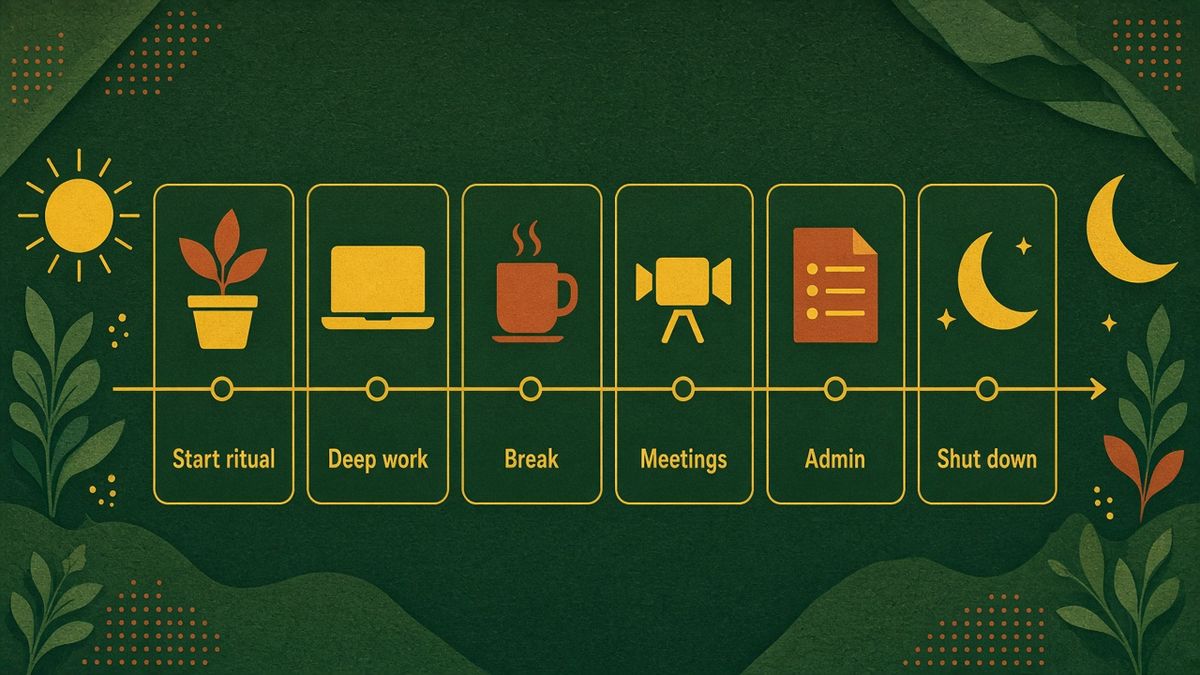
Start with a short ritual that replaces your commute. It could be a 10-minute walk, making coffee and reviewing your task list, or getting properly dressed. Then plan your work in blocks: deep focused work when your energy is highest, meetings grouped together, and smaller admin tasks for the afternoon dip. End with a shut-down routine where you write tomorrow’s top three tasks, close the laptop and leave your workspace.
💡 Try time blocking for one week
Block your calendar in 60 to 90 minute chunks and give each block one job. Colleagues can see when you are busy, and you stop jumping between tasks. My guide on how to use your time better has more ways to plan a productive day.
Step 4: Protect your focus from home distractions
Home has its own distractions: laundry, the fridge, the doorbell, children, pets and the television. Phones are even worse when nobody can see you scrolling. You cannot remove every distraction, but you can make focus the easy choice.
Put your phone in another room or in a drawer during deep-work blocks. Use your computer’s focus mode to silence notifications, and close email and chat when you need to concentrate. Save household chores for your breaks; a five-minute task such as hanging washing can be a good reason to stand up, as long as it does not swallow an hour.
⚠️ Watch out for “always on”
Many new remote workers answer messages instantly to prove they are working. This trains everyone to expect replies at any time and destroys your focus. Agree reasonable response times with your team, for example within two hours during working hours.
Step 5: Communicate more than you think you need to
In an office, people see you working. At home, they only see what you share. That is why remote workers need to communicate more clearly and more often than they did before.
Tell your team your working hours and update your status when you step away. Share short written updates on what you finished, what you are working on and what is blocking you. When something is complex or emotional, switch from chat to a quick call; tone is easy to misread in text. And keep meeting notes in a shared document so decisions do not live only in someone’s memory.
Step 6: Stay connected so you do not feel isolated
Loneliness is one of the most common complaints from people who work from home, especially those who live alone. You lose the small chats by the coffee machine that make work feel human.
Build connection on purpose. Keep your camera on for some calls, schedule a short weekly chat with a colleague that is not about work, and join an online community for people in your field. If your company allows it, work from a café, library or coworking space one day a week. Hybrid workers can plan office days around team meetings so they get the most social value from them.
Step 7: Look after your body and energy
Working from home often means moving less. There is no walk to the station, no stairs between meetings and lunch is three steps from your desk. Over months, that adds up to stiffness, back pain and low energy.
Stand up at least once an hour, take calls on your feet when you do not need the screen, and go outside for daylight during your lunch break. Keep water on your desk and avoid grazing on snacks all day. If you feel drained, think about energy rather than hours; my article on how to manage your energy instead of your time explains why that works better.
Step 8: Set boundaries with family and housemates
If you share your home, the people around you need to understand that being at home does not mean being available. Without clear boundaries, interruptions become constant and resentment builds on both sides.
Share your working hours with your family or housemates and put them somewhere visible. Use a simple signal, such as a closed door or headphones on, for times when you must not be disturbed. Agree on household responsibilities in advance so you are not expected to take every parcel or handle every chore just because you are home. And respect your own boundary too: when the workday ends, stop.
Step 9: Review and adjust after 30 days
Your first setup will not be perfect. After about a month, take 20 minutes to review what is working and what is not.
| Question | If the answer is no, try this |
|---|---|
| Do I start and finish at roughly the same time every day? | Add a fixed start ritual and a shut-down checklist |
| Can I focus for at least two hours a day without interruptions? | Move deep work to your best time of day and silence notifications |
| Is my body comfortable at the end of the day? | Raise your screen, adjust your chair and add movement breaks |
| Do I feel connected to my team? | Book a weekly informal chat and one in-person or video social |
| Are my work files backed up automatically? | Move them into one synced cloud folder and test a restore |
Fix the single biggest problem first rather than changing everything at once. Small, steady improvements are what turn working from home from a struggle into an advantage.
Home office costs and tax: US, UK and EU basics
Setting up a home office costs money, and some of it may be claimable depending on where you live and how you work. The rules below are a simplified overview, not tax advice.
| Where you work | General position (check current rules) |
|---|---|
| United States | Self-employed people may be able to claim the home office deduction for space used regularly and exclusively for business; the IRS simplified method uses a set rate per square foot up to a limit. Most W-2 employees cannot deduct unreimbursed home office costs, so ask your employer about a remote work allowance. |
| United Kingdom | Employees who must work from home may be able to claim tax relief for extra household costs, either a flat weekly rate or actual extra costs, through GOV.UK. Self-employed people can use simplified flat rates or a proportion of actual costs. |
| European Union | Rules vary by country. Some countries offer a flat home-working allowance or deduction, and some employers pay a monthly remote work allowance. Check your national tax authority. |
📌 Keep your receipts in one place
Whatever the rules where you live, save receipts for desks, chairs, equipment and internet upgrades in your cloud folder as you buy them. It makes claiming much easier, and my guide to business record keeping shows a simple system.
Keep your work files safe at home
pCloud gives you secure cloud storage with EU or US data location and one-time lifetime plans, so your files are synced and backed up without another monthly bill.
Not sure yet? try it free first.
Affiliate links. I may earn a commission at no extra cost to you.
Frequently Asked Questions
How long does it take to adjust to working from home?
Most people need two to six weeks to settle into a new routine. The first week often feels productive because of the novelty, then tiredness or isolation can kick in. A fixed schedule, a dedicated workspace and regular contact with colleagues usually make the transition smoother.
How do I stay productive when working from home?
Start at a set time with a short ritual, plan your day in focused blocks, keep your phone away during deep work and finish with a shut-down routine. Working in the same dedicated space every day also helps your brain switch into work mode.
What do I need to set up a home office?
At minimum you need a desk at the right height, a supportive chair, a reliable internet connection, a screen at eye level (a laptop stand and external keyboard work well) and headphones with a microphone. Good light and a way to back up your files are also important.
How can I avoid feeling lonely when working remotely?
Keep your camera on for some calls, schedule informal chats with colleagues, join online communities in your field and work from a café, library or coworking space now and then. Planning in-person office days around team events also helps hybrid workers stay connected.
How do I stop working late when I work from home?
Set a fixed finish time and end each day with a short shut-down routine: write tomorrow’s top three tasks, close your apps and leave your workspace. Turning off work notifications on your phone after hours makes the boundary much easier to keep.
Is it safe to store work files at home?
It is safe if you use encrypted, automatically backed-up cloud storage, a screen lock and strong unique passwords. Avoid keeping the only copy of important files on one laptop or USB stick, and follow your employer’s rules for confidential data.
Start with one change today: set up a proper workspace or move your files into a single backed-up folder. Then add the next step each week. Within a month or two, working from home will feel less like a struggle and more like the flexible, focused way of working it can be.
Affiliate disclosure: some links in this post are affiliate links, so I may earn a commission at no extra cost to you. I only recommend tools I’d use myself.