If you want to know how to track marketing campaigns properly, start with one simple idea: every link you share should tell you where the visitor came from and what they did next. Without that, you are spending money and time on adverts, emails and posts blindly. This guide shows you, step by step, how to tag your links with UTM parameters, read the results in Google Analytics 4, track each channel and build a one-page dashboard you can check in ten minutes a week.
✔ Key takeaways
⏱ About 12 min read · the short version is right here
- To track marketing campaigns you need three things: a clear goal, tagged links (UTM parameters) and one place to read the results, usually Google Analytics 4.
- Always fill in at least utm_source, utm_medium and utm_campaign, in lowercase, using one shared naming sheet.
- Set up the actions that matter (sign-ups, sales, bookings) as key events in GA4, or you will only see visits, not results.
- Track SEO separately with a rank tracker and Google Search Console, because organic traffic does not carry UTM tags.
- Judge campaigns on cost per lead or cost per sale, not on likes, impressions or clicks alone.
- In the UK and EU, analytics cookies need consent, so set up a proper cookie banner before you rely on the numbers.
📋 In this guide
- Why you should track every marketing campaign
- What “tracking a campaign” actually means
- UTM parameters explained (with examples)
- How to track marketing campaigns in 7 steps
- How to track each channel: email, social, ads, SEO and offline
- Which metrics to watch (and which to ignore)
- Build a simple one-page campaign dashboard
- Common tracking mistakes to avoid
- Privacy and consent: GDPR, UK and US basics
- Free and low-cost tracking tools
- FAQ
🔍 Updated 15 Nov 2026: fully rewritten for small businesses in the US, UK and Europe, with Google Analytics 4 (GA4) terms. Tools change their menus often, so names of reports may differ slightly in your account.
Why you should track every marketing campaign
When I started writing articles online, I was often surprised by which pieces became popular. Posts I thought were my best attracted few readers, while quick ones I barely promoted pulled in steady traffic. I only understood why once I started tracking where visitors came from. The same thing happens with adverts: the channel you love is not always the one that brings customers.
Tracking your campaigns lets you answer the questions that really matter for a small business: Which channel brings paying customers, not just visitors? Which email, post or advert made people act? Where should I spend next month’s budget? And what should I stop doing? Without tracking, every decision is a guess. With it, you can move money from what does not work to what does, month after month.
📌 Who this guide is for
Small business owners, freelancers and solo marketers who run a website and promote it through email, social media, paid ads or SEO. If you have not written your plan yet, start with my guide on how to write a marketing plan, then come back here to measure it.
What “tracking a campaign” actually means
Tracking a campaign means connecting three things: the action you took (an email, a Facebook post, a Google ad), the visitor it brought to your site, and what that visitor did there. A campaign is simply a group of activities with one goal, for example “Black Friday sale”, “spring webinar” or “new pricing page launch”.
Most analytics tools can already see some of this. Google Analytics knows when someone arrives from Google search or from another website. But it cannot tell the difference between your newsletter link and a link a friend shared in WhatsApp, or between two versions of the same advert. That is why you add small labels to your links, called UTM parameters.
| What you want to know | What gives you the answer |
|---|---|
| Where did visitors come from? | UTM tags plus the traffic acquisition report in GA4 |
| Did they do what I wanted? | Key events (sign-ups, purchases, bookings) set up in GA4 |
| Which campaign was worth the money? | Cost from your ad or email platform divided by the leads or sales GA4 shows |
| Is my SEO improving? | Google Search Console and a keyword rank tracker |
| Did offline promotion work? | A unique QR code, short link, discount code or landing page per campaign |
UTM parameters explained (with examples)
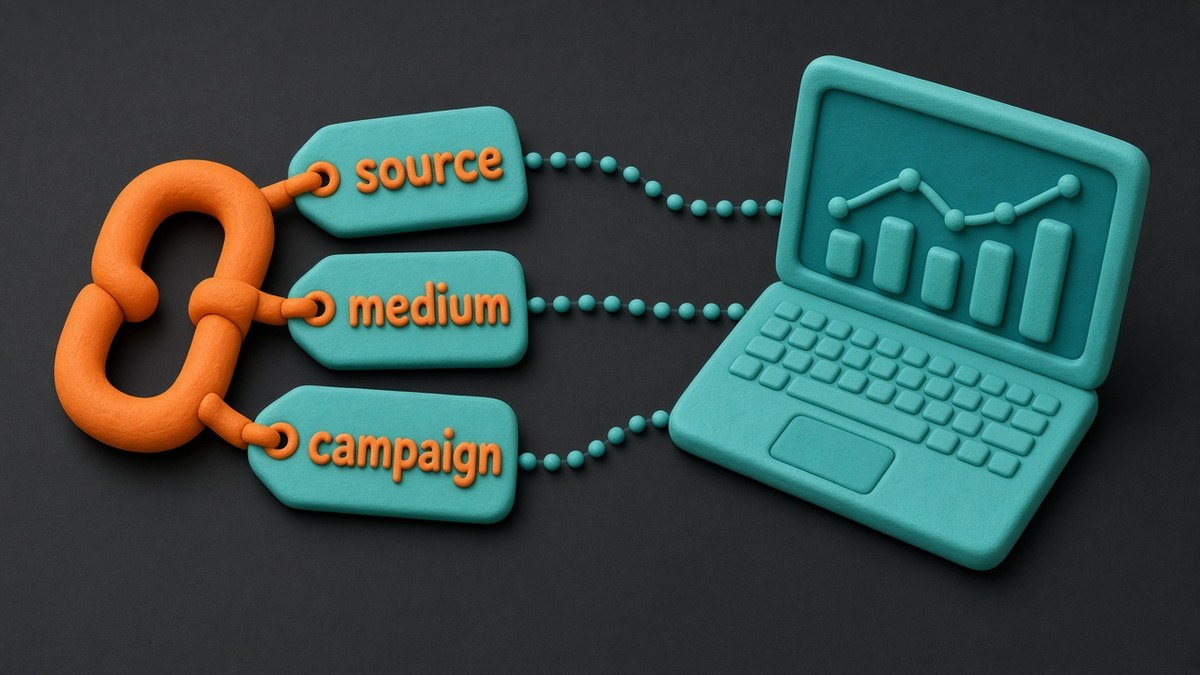
UTM parameters are short tags you add to the end of a link. When someone clicks it, your analytics tool reads the tags and files the visit under the right source, medium and campaign. They do not change the page the visitor sees.
| Parameter | What it records | Example |
|---|---|---|
| utm_source | Who sent the traffic | newsletter, facebook, google, partner-blog |
| utm_medium | The type of channel | email, social, cpc, referral, qr |
| utm_campaign | The campaign name | black-friday-2026, spring-webinar |
| utm_content | Which version or link was clicked | header-button, blue-banner, video-ad |
| utm_term | The paid keyword (mainly search ads) | crm-for-coaches |
A full tagged link looks like this:
https://www.example.com/webinar/?utm_source=newsletter&utm_medium=email&utm_campaign=spring-webinar&utm_content=header-button
💡 Use the free Campaign URL Builder
You do not need to type tags by hand. Google’s free Campaign URL Builder creates the link for you. Paste the page address, fill in the fields and copy the result into your email, post or ad.
⚠️ Never tag internal links
Do not add UTM tags to links between pages on your own website. It starts a new session in GA4 and wipes out the real source of the visit, which makes your reports less accurate.
How to track marketing campaigns in 7 steps
Here is the simple process I recommend for any small business. It works whether you run one campaign a month or ten.

Set one clear goal per campaign
Decide what success looks like before you start: newsletter sign-ups, webinar registrations, booked calls or sales. One main goal keeps the report simple.
Turn the goal into a key event in GA4
In Google Analytics 4, mark the action that matters (for example a thank-you page view, a form submission or a purchase) as a key event, which is what GA4 now calls a conversion. If you sell online, connect your shop platform so purchase values are recorded too.
Create a naming sheet
Make a shared spreadsheet with your approved source, medium and campaign names. Write everything in lowercase with hyphens, for example facebook, social, black-friday-2026. Consistent names stop your reports splitting into messy duplicates.
Tag every external link
Use the URL builder for every link in emails, social posts, bio links, partner posts and ads. Shorten long links with a link shortener if they look ugly in a post, but tag them first.
Track the channels UTMs miss
Use Google Search Console and a rank tracker for SEO, unique QR codes or discount codes for print and events, and call tracking or a “how did you hear about us?” question for phone enquiries.
Report weekly, decide monthly
Check a short dashboard once a week to spot problems early. Once a month, compare campaigns by cost per lead or cost per sale and move budget to the winners.
Improve one thing at a time
Change one element (headline, offer, audience or send time), tag it with a new utm_content value and compare it with the old version. Small, tracked tests add up quickly.
How to track each channel: email, social, ads, SEO and offline
Each channel needs a slightly different approach. Use this as a checklist when you plan a new campaign.
Email marketing
Most email tools can add UTM tags automatically to every link in a broadcast, so switch that option on. Inside the email platform, watch clicks and unsubscribes; inside GA4, watch sign-ups and sales from utm_medium=email. If you are building a list from scratch, my guide to email marketing for small business covers the basics, and Kit is the email platform I recommend for creators and small businesses because its link tracking and subscriber tags are easy to use.
Social media
Tag the link in your bio, in every post and in every story. Use the platform name as the source (instagram, linkedin, facebook) and social as the medium. For paid social, also install the platform’s own pixel or conversion tag, because it helps the platform’s algorithm find buyers, but compare its numbers with GA4, since each platform tends to credit itself.
Paid search ads
Google Ads uses auto-tagging (a gclid code added to each click), so link your Google Ads and GA4 accounts instead of tagging Google ads by hand. For Microsoft Advertising and other networks, use UTM tags or the network’s own auto-tagging option. Always import or record your ad cost so you can work out cost per lead. If you are deciding where to put your budget, see my comparison of SEO vs PPC.
SEO and organic search
Organic visitors arrive from Google without any tags, so UTM parameters cannot help here. Instead, connect Google Search Console to see which search queries and pages bring clicks, and use a rank tracker to follow your target keywords over time. I use SE Ranking for this, because its rank tracker and Search Console integration show in one place whether a campaign, such as a new guide or a round of link building, is actually moving your positions. You can read my full SE Ranking review if you want the details first.
Offline and events
Printed flyers, shop posters, podcasts and events can be tracked too. Create a tagged link with utm_medium=qr or utm_medium=offline, turn it into a QR code, or send people to a short, memorable landing page used only for that campaign. A unique discount code works well for sales, because it shows up at the checkout even if the visitor typed your address by hand.
Which metrics to watch (and which to ignore)
Tracking can produce more numbers than you can use. Focus on the metrics that connect directly to money and ignore the rest unless you are diagnosing a problem.
| Watch closely | Use for diagnosis | Mostly ignore |
|---|---|---|
| Leads or sales per campaign (key events) | Click-through rate on emails and ads | Total impressions |
| Cost per lead and cost per sale | Engagement rate and time on page | Follower count on its own |
| Revenue per campaign and return on ad spend | Landing page conversion rate | Likes and reactions |
| Keyword positions for pages that sell | Bounce or exit pages | Vanity totals with no goal behind them |
💡 Link it to your KPIs
Your campaign metrics should feed into the few numbers that run your business. My guide to small business KPIs explains how to pick them, and customer lifetime value shows how much you can afford to spend to win each customer.
Build a simple one-page campaign dashboard
You do not need an expensive tool to see your results. A one-page dashboard in a spreadsheet or in Google’s free Looker Studio is enough for most small businesses. Keep it to one row per campaign and these columns:
- Campaign name (exactly as in your utm_campaign tag)
- Channel (utm_medium)
- Dates live
- Cost (ad spend, tool cost or time)
- Visitors
- Leads or sales (key events)
- Cost per lead or sale
- Notes and next action
Fill in the visitor and key event numbers from the GA4 traffic acquisition report filtered by campaign, and the cost from your ad or email platform. Once a month, sort by cost per lead. The bottom rows are your candidates to fix or stop; the top rows deserve more budget. If you want a tool that bundles funnels, email and sales stats in one dashboard, Systeme.io includes basic funnel and email statistics even on its free plan.
Common tracking mistakes to avoid
- Inconsistent names: Facebook, facebook and fb become three different sources. Use the naming sheet and lowercase only.
- Tagging internal links: it overwrites the real source of the visit.
- No key events: you see traffic but not results, so you cannot compare campaigns fairly.
- Trusting each platform’s own numbers: every ad network credits itself; use GA4 as your neutral referee and compare.
- Judging too soon: give a campaign enough time and traffic before deciding, especially for SEO, which often takes months.
- Forgetting costs: a campaign with many sales can still lose money once you add ad spend and your time.
Privacy and consent: GDPR, UK and US basics
Tracking must respect privacy laws. In the UK and the European Union, analytics and advertising cookies generally need the visitor’s consent before they are set, under GDPR and the ePrivacy rules (PECR in the UK). That means a proper cookie banner that lets people accept or reject, not one that only says “OK”. Google’s Consent Mode can help GA4 and Google Ads respect those choices.
In the United States the rules vary by state, with California’s privacy law the best known, so explain your tracking clearly in your privacy policy and honour opt-out requests. Whatever your location, never put personal data such as email addresses or names into UTM tags, because they end up stored in your analytics reports.
⚠️ Not legal advice
This section is a general overview for small businesses. Check the guidance from your data protection authority, such as the ICO in the UK, or a qualified adviser before you launch tracking on a large scale.
Free and low-cost tracking tools
| Tool | What it helps you track | Cost |
|---|---|---|
| Google Analytics 4 | Visits, sources, UTM campaigns and key events | Free |
| Google Search Console | Search queries, clicks and pages from Google | Free |
| Campaign URL Builder | Creating correctly tagged links | Free |
| Looker Studio or a spreadsheet | One-page campaign dashboard | Free |
| SE Ranking | Keyword rankings, competitors and site audits for SEO campaigns | Paid, with a free trial (see SE Ranking pricing) |
| Kit | Email clicks, subscriber tags and automated UTM tags | Free plan, paid plans for more features |
| Systeme.io | Funnel, email and sales statistics in one place | Free plan, paid plans for more |
If you want to go deeper into measuring growth, Lean Analytics by Alistair Croll and Benjamin Yoskovitz is a practical book on picking the one metric that matters at each stage (UK readers: Lean Analytics on Amazon UK). For more on choosing tools, see my list of the best SEO tools for small business and the rest of my tool reviews.
Track your SEO campaigns properly
See which keywords and pages your campaigns actually move, with rank tracking, competitor research and site audits in one dashboard.
Affiliate link. I may earn a commission at no extra cost to you.
Frequently Asked Questions
What is the easiest way to track marketing campaigns?
Add UTM parameters to every link you share, set up your main goal as a key event in Google Analytics 4, and check the traffic acquisition report filtered by campaign each week. A free URL builder and a simple spreadsheet dashboard are enough to start.
Which UTM parameters are required?
Use at least utm_source, utm_medium and utm_campaign on every tagged link. Add utm_content to compare versions of an ad or link, and utm_term mainly for paid search keywords.
Do I need UTM tags for Google Ads?
Usually not. Link Google Ads with GA4 and keep auto-tagging switched on, which adds a click ID to each ad click. Use UTM tags for other ad networks, emails, social posts and partner links.
How do I track SEO results if organic traffic has no UTM tags?
Use Google Search Console to see search queries, clicks and pages, and a rank tracker to follow your target keywords over time. Compare those with key events in GA4 for organic search traffic.
How often should I review campaign results?
Glance at a short dashboard once a week to catch problems early, and make budget decisions once a month, when each campaign has had enough time and traffic to show a real trend.
Is campaign tracking allowed under GDPR?
Yes, but in the UK and EU analytics and advertising cookies normally need consent first. Use a cookie banner that lets visitors accept or reject, explain tracking in your privacy policy and never put personal data in UTM tags.
Start small: pick your next campaign, write down its goal, tag every link and check the results in a week. Once you see which channels actually bring customers, you will never want to advertise blindly again.
Affiliate disclosure: some links in this post are affiliate links, so I may earn a commission at no extra cost to you. I only recommend tools I’d use myself.