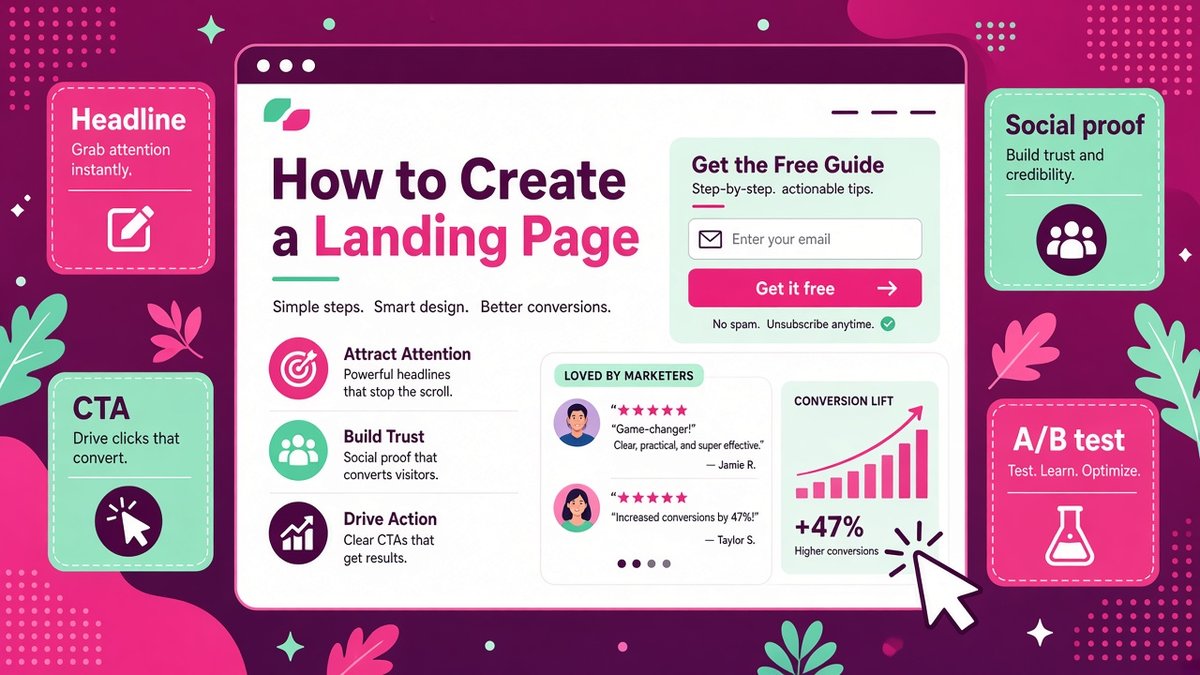
Knowing how to create a landing page that converts can double the results of every ad, email and social post you already pay for or spend time on. A landing page is a single, focused page with one goal, such as collecting an email address, booking a call or selling a product. Unlike your homepage, it removes distractions and guides visitors toward one clear action. In this guide, I break down the anatomy of a high-converting landing page, give you an 8-step process you can follow this week, share copywriting tips and show you how to test and improve it, with practical notes for small businesses and creators in the US, UK and Europe.
Want to compare tools before you choose? Browse my honest software reviews.
✔ Key takeaways
- A landing page has one goal and one call to action, which is why it converts better than a homepage.
- The core sections are hero, benefits, proof, details, FAQ and a repeated call to action.
- Match the page headline to the ad, email or link that sent the visitor.
- Ask for as little information as possible: first name and email is often enough.
- Test one change at a time, such as the headline or button, and wait for enough data.
- For UK and EU visitors, collect clear consent and link to your privacy policy.
📋 In this guide
- What is a landing page?
- Types of landing pages
- Anatomy of a high-converting landing page
- How to create a landing page in 8 steps
- Landing page copy tips that convert
- Tools to create a landing page
- Testing and improving your landing page
- Privacy, GDPR and legal basics
- Common landing page mistakes
- Frequently Asked Questions
- Final thoughts
What is a landing page?
A landing page is a standalone web page built for a specific campaign or offer. Visitors “land” on it after clicking an ad, a link in an email, a social post or a search result. It usually has no main navigation menu, so the only real choice is to take the action or leave.
Your homepage has to serve everyone: new visitors, existing customers, job seekers and journalists. A landing page serves one person with one need. That focus is why focused pages often convert several times better than sending traffic to a general page.
Types of landing pages
| Type | Goal | Example |
|---|---|---|
| Lead capture (squeeze) page | Collect an email address | Free checklist, template or mini-course |
| Sales page | Sell a product or service | Online course, coaching package, software |
| Click-through page | Warm visitors up before checkout | Product tour that leads to pricing |
| Webinar or event page | Get registrations | Live workshop sign-up |
| Booking page | Schedule a call or appointment | Free consultation for an agency |
| Thank-you page | Confirm and suggest a next step | Download link plus a small offer |
For most small businesses, the first landing page should be a lead capture page tied to a useful freebie. My guide on how to create a lead magnet shows how to pick an offer people actually want.
Anatomy of a high-converting landing page
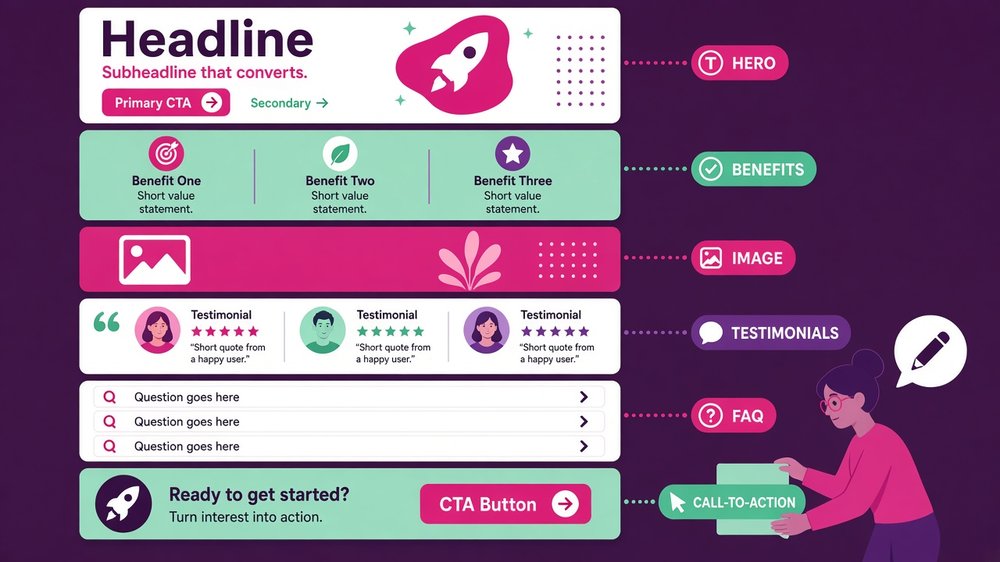
The building blocks of a high-converting landing page: hero, benefits, image, testimonials, FAQ and a clear call to action.
High-converting landing pages tend to follow the same structure. You can adapt it for almost any offer:
- Hero section: a headline that names the result, a one-line subheadline, a relevant image and the main call-to-action button or form.
- Benefits: three to five bullet points that explain what the visitor gets and why it matters to them.
- Visual: a picture of the product, a mock-up of the freebie or a short video.
- Social proof: testimonials with names and photos, star ratings, client logos or numbers such as “Join 3,000 subscribers”.
- Details: what is included, how it works, price and guarantee for sales pages.
- FAQ: answers to the objections that stop people from acting.
- Final call to action: repeat the button or form at the bottom for people who read everything.
How to create a landing page in 8 steps
Pick one goal and one audience
Write it down: “This page gets [who] to [action] because [benefit].” Example: “This page gets new UK Etsy sellers to download my pricing calculator because they want to stop undercharging.”
Know where traffic comes from
A visitor from a Facebook ad, a Google search and your newsletter each arrive with different expectations. Match the headline and wording to the source so the page feels like the next logical step.
Write the headline and offer first
Lead with the outcome, not the product name. “Price your handmade products with confidence in 10 minutes” beats “Pricing Calculator v2”.
Draft the rest of the copy
Add benefits, proof, details and FAQs before you open any design tool. Good copy on a plain page beats beautiful design with weak words.
Build the page
Use a landing page builder or funnel tool with a template. Keep one column, plenty of white space, large text and a high-contrast button. Remove the navigation menu.
Keep the form short
Ask for first name and email for a freebie. Every extra field reduces sign-ups, so only ask for what you will actually use.
Connect email and a thank-you page
Send the freebie instantly and start a short nurture sequence. My welcome email sequence template gives you five emails to start with.
Check mobile, speed and tracking
Test the page on a phone, check it loads quickly, and set up conversion tracking in your analytics tool before sending traffic.
💡 Use the 5-second test
Show your page to someone for five seconds, then ask what it offers and what they should do next. If they cannot answer both, simplify the headline and button.
Landing page copy tips that convert
- Speak to one person: use “you” and describe their situation in their own words.
- Sell the result: people want the outcome (more clients, less stress), not the features.
- Make the button specific: “Send me the checklist” converts better than “Submit”.
- Use proof near the button: a short testimonial right next to the form reduces doubt at the moment of decision.
- Answer objections: price, time, trust and “will this work for me?” should all be covered in the FAQ.
- Add genuine urgency only: real deadlines or limited places work; fake countdown timers damage trust and can breach consumer protection rules.
| Weak headline | Stronger headline |
|---|---|
| Welcome to our webinar | Get your first 100 email subscribers in 30 days: free live workshop |
| Our consulting services | Cut your bookkeeping time in half: book a free 20-minute call |
| Download our ebook | The 12-point checklist to launch your online store without costly mistakes |
Tools to create a landing page
You can build a landing page with a WordPress page builder, but connecting forms, email and payments takes time. A dedicated tool is faster and usually includes templates that already follow the structure above.
My first pick for small businesses is Systeme.io because it includes landing pages, email marketing, checkout and automation in one account, and its free plan is enough to launch your first page. When I checked its pricing page in late October 2026, the free plan allowed up to 2,000 contacts and 3 funnels, with paid plans from $17 per month. If your main goal is growing a newsletter, Kit (formerly ConvertKit) offers free landing pages and forms linked directly to its email tools.
| Tool | Starting price | Best for |
|---|---|---|
| Systeme.io | Free plan; paid from $17/month | All-in-one: pages, email, checkout and courses |
| Kit | Free plan available | Creators and newsletter sign-up pages |
| WordPress + page builder | Varies | Sites already on WordPress |
| Carrd, Unbounce, Leadpages | Varies | Simple one-pagers or advanced A/B testing |
Compare more options in my list of the best free funnel builders, or read my full Systeme.io review before you choose.
⚠️ Check current prices
Prices are in USD and may change. UK and EU buyers may also pay VAT, so always confirm on the official pricing page.
Testing and improving your landing page
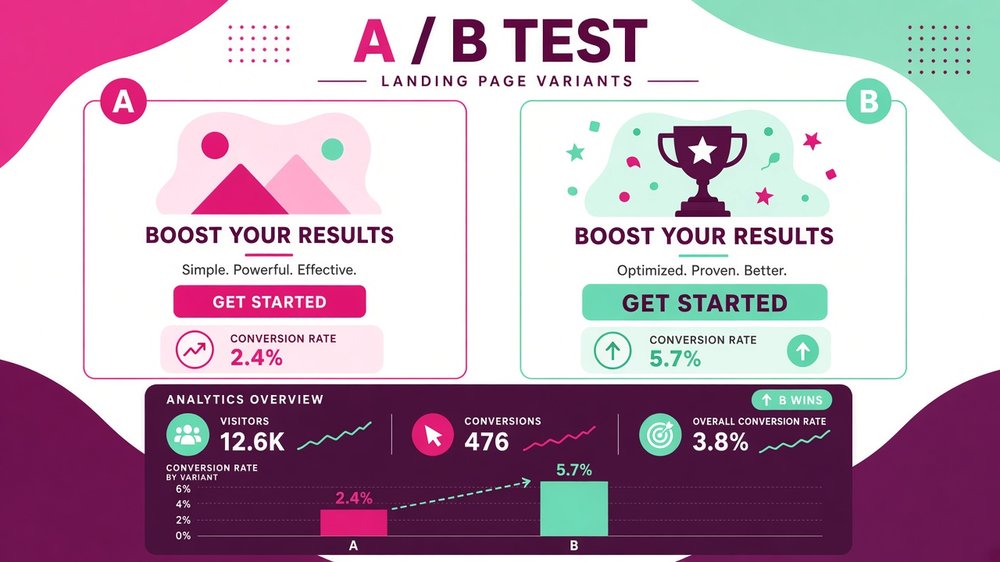
An A/B test compares two versions of a landing page to find out which headline, layout or button converts better.
Your first version is a starting point, not a finished product. Measure the conversion rate (conversions divided by visitors) and improve the page step by step.
| What to test | Example change | Why it matters |
|---|---|---|
| Headline | Outcome-focused vs question-based | The biggest influence on whether people keep reading |
| Call-to-action button | “Get the free guide” vs “Send it to me” | Directly affects clicks |
| Form length | Email only vs name and email | Fewer fields usually mean more sign-ups |
| Social proof | Testimonials vs subscriber count | Builds trust for different audiences |
| Hero image | Product mock-up vs photo of you | Changes how quickly people understand the offer |
Test one element at a time and wait until each version has had a meaningful amount of traffic, ideally a few hundred visitors each, before declaring a winner. To see how the page fits into your full customer journey, read my guide on how to build a sales funnel.
📌 What is a good conversion rate?
It varies by offer and traffic. Many lead capture pages convert roughly 20% to 40% of targeted visitors, while sales pages often convert 1% to 5%. Compare against your own past results first.
Privacy, GDPR and legal basics
If you collect personal data from visitors in the UK or EU, GDPR applies even if your business is based elsewhere. Keep it simple:
- Say clearly what people will receive, such as “the checklist plus weekly marketing tips”.
- Do not pre-tick marketing consent boxes.
- Link to your privacy policy near the form.
- Use a cookie banner if you run tracking or advertising cookies.
- Choose tools that offer a data processing agreement (DPA) and let people unsubscribe easily.
- In the US, follow CAN-SPAM rules for marketing emails, including a working unsubscribe link and your postal address.
Common landing page mistakes
- Sending traffic to the homepage instead: visitors get lost among too many choices.
- More than one goal: a page that asks people to subscribe, follow and buy usually gets none of them.
- Vague headlines: if visitors cannot tell what they get in five seconds, they leave.
- Slow loading: large images and heavy scripts lose mobile visitors.
- No proof: new visitors need a reason to trust you.
- Never testing: small headline or button changes can lift results significantly.
Frequently Asked Questions
How do I create a landing page for free?
Use a tool with a free plan, such as Systeme.io or Kit. Pick a template, write a clear headline and benefits, add a short form, connect your email sequence and publish on the free subdomain or your own domain.
What should a landing page include?
A clear headline, a short subheadline, benefit bullets, a relevant image, social proof, an FAQ and one call to action repeated near the top and bottom.
How long should a landing page be?
Short pages work well for free offers, while expensive products need longer pages that answer more questions. Make it as long as needed to answer the main objections, and no longer.
Is a landing page different from a website?
Yes. A website has many pages and goals. A landing page is a single page focused on one offer and one action, usually without a navigation menu.
Do I need my own domain for a landing page?
Not to start. Most builders give you a free subdomain. A custom domain looks more professional and builds trust once you start sending regular traffic.
How do I make my landing page GDPR compliant?
Explain what people will receive, use unticked consent boxes, link to your privacy policy, use tools with a data processing agreement and make unsubscribing easy.
Final thoughts
Now you know how to create a landing page step by step: choose one goal, match the message to your traffic, write a results-focused headline, keep the form short, add proof and a clear call to action, and test one change at a time. A simple page built this week will teach you more than a perfect page that never launches.
Your next step: write your headline and three benefit bullets today, then build the page with a free template and send it to your newsletter or social followers.
Build your first landing page for free
Systeme.io gives you landing page templates, email automation and checkout in one place, with a free plan to get started.
Start free with Systeme.io →Affiliate link. I may earn a commission at no extra cost to you.
Affiliate disclosure: some links in this post are affiliate links, so I may earn a commission at no extra cost to you. I only recommend tools I’d use myself.