An SEO-friendly website is one that search engines can crawl easily, understand quickly and recommend with confidence. Great content matters, of course. However, if your site is slow, messy or hard to crawl, even the best article can sit on page five.
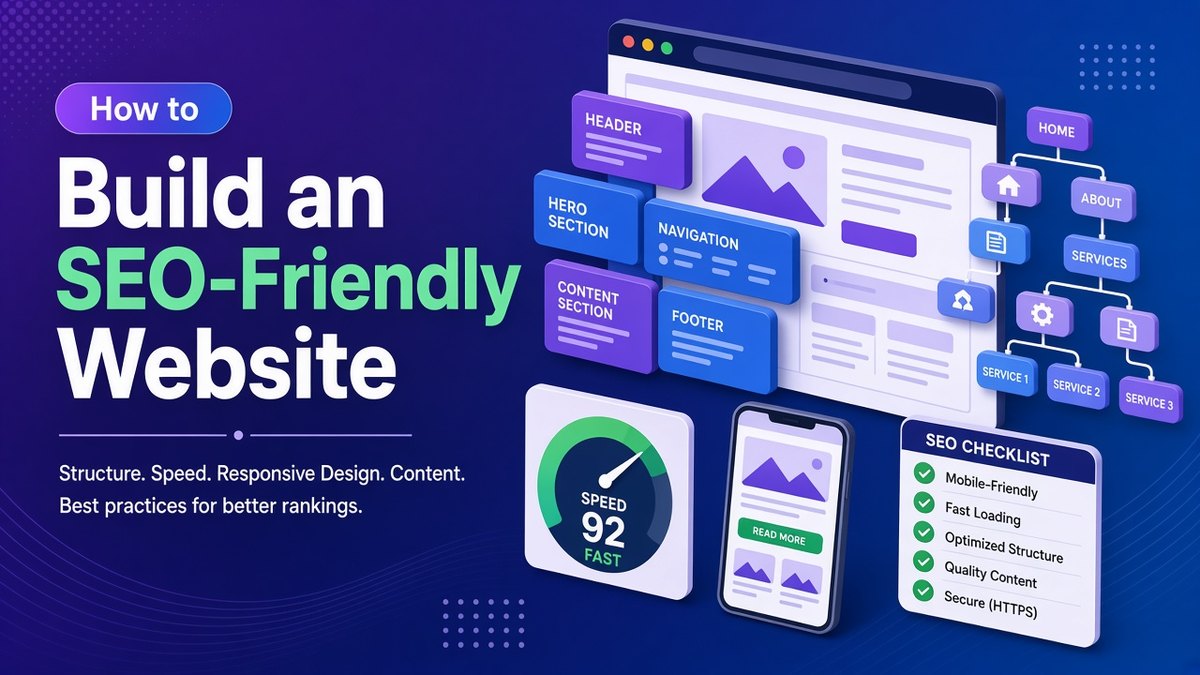
In this step-by-step guide, I show you how to build that foundation properly. We will cover structure, hosting, URLs, mobile design, Core Web Vitals, on-page basics, internal links, images, schema and indexing. Each step includes practical settings you can apply today, especially on WordPress.
✔ Key takeaways
- Plan a shallow structure first: homepage, then categories, then articles, with every page within three clicks.
- Use fast hosting, HTTPS and a lightweight theme, because speed and security are ranking basics.
- Hit Core Web Vitals targets: LCP under 2.5 seconds, INP under 200 milliseconds and CLS under 0.1.
- Write unique titles, one H1 per page, descriptive alt text and clean, short URLs.
- Submit an XML sitemap, check robots.txt and monitor indexing in Google Search Console.
📋 In this guide
- Why an SEO-friendly website matters
- Plan a clear site structure
- Pick the right platform, host and HTTPS
- Set clean, readable URLs
- Design mobile-first
- Pass Core Web Vitals
- Get on-page basics right
- Build internal links and breadcrumbs
- Optimise every image
- Add structured data
- Help Google crawl and index
- SEO-friendly website launch checklist
- Frequently Asked Questions
Why an SEO-friendly website matters
Think of your website as a shop. Content is the stock on the shelves. Meanwhile, technical SEO is the layout, the lighting and the signs. If customers cannot find the aisle, they leave, no matter how good the products are. Similarly, if Googlebot cannot reach or render your pages, they never rank.
Building an SEO-friendly website from day one also saves money. Fixing structure and URLs later often means redirects, broken links and lost rankings. If you are new to SEO, read my beginner guide to SEO first, then come back to this practical build.
Step 1: Plan a clear site structure
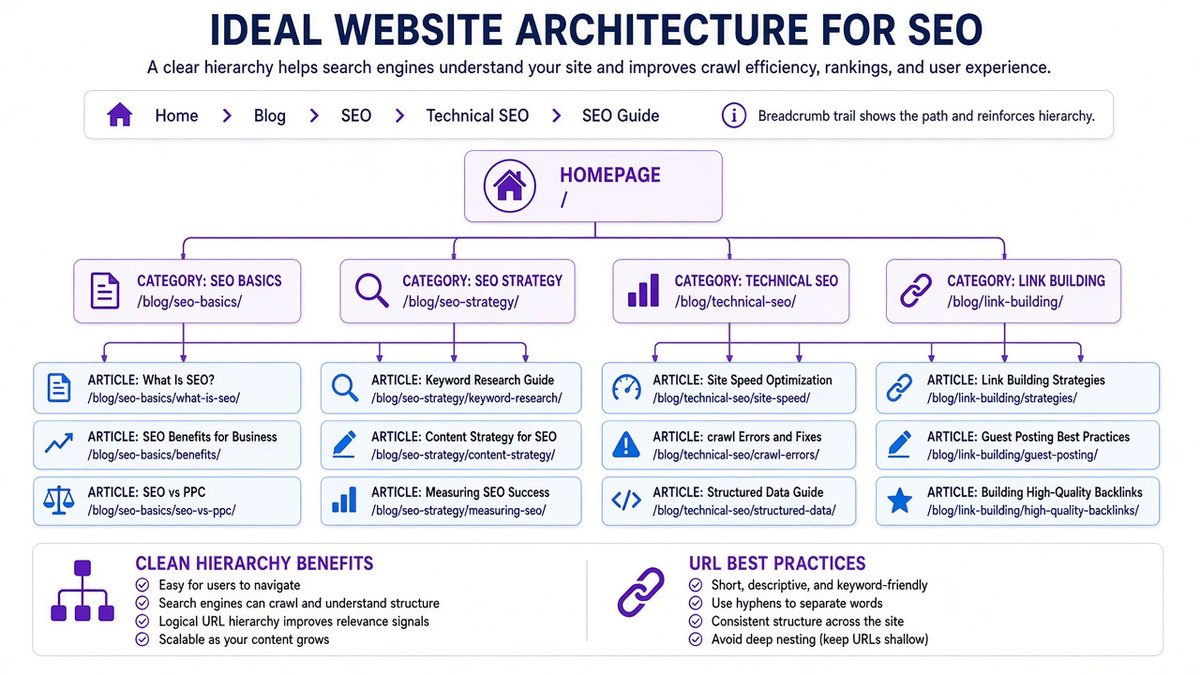
Before you design a single page, sketch your structure on paper. In general, a good structure groups related content together and keeps every page close to the homepage. As a result, both visitors and crawlers move around easily.
Start with your homepage
First, the homepage should link to your main categories or services. It usually has the most authority, so it passes value down to the rest of the site.
Create a few strong categories
Group posts into five to eight clear topics. Also, avoid dozens of thin categories with only one post each.
Keep it shallow
Ideally, make every important page reachable within three clicks of the homepage. After all, crawlers visit deeply buried pages less often.
💡 Use the same structure in your URLs
If an article lives in your SEO category, its breadcrumb and menu should reflect that. Consistency helps Google understand how your pages relate to each other.
Step 2: Pick the right platform, host and HTTPS
WordPress remains one of the most flexible platforms for an SEO-friendly website. It gives you full control over titles, URLs, redirects and schema through plugins such as Yoast SEO. Hosted builders work too. However, they often limit technical control.
Next, choose hosting carefully. Cheap shared hosting can be slow under load, which hurts both users and rankings. Instead, look for servers near your main audience, built-in caching and a free SSL certificate. Moreover, a CDN such as Cloudflare can speed up delivery for visitors in other countries.
Finally, use a lightweight theme. Heavy page builders and bloated themes add scripts that slow every page. For example, GeneratePress and similar themes load very little code by default.
⚠️ HTTPS is not optional
Browsers mark plain HTTP pages as not secure, and visitors notice. Make sure every page loads over HTTPS and that HTTP versions redirect permanently with a 301.
Step 3: Set clean, readable URLs
Your URL is one of the first things people and search engines see. In fact, a clean URL tells them what the page is about before they click. In WordPress, set permalinks to “Post name” under Settings, then Permalinks.
| Good URL | Poor URL | Why it matters |
|---|---|---|
| /seo-friendly-website/ | /?p=1944 | Readable and descriptive |
| /blog/keyword-research/ | /blog/2026/10/20/post-title-here-final-v2/ | Short and evergreen |
| /services/web-design/ | /Services/Web_Design.HTML | Lowercase, hyphens, no file extension |
Once a page is live, avoid changing its URL. If you must, add a 301 redirect from the old address so you keep its links and rankings.
Step 4: Design mobile-first
Google now uses the mobile version of your pages for indexing and ranking. In practice, this means your mobile site is your real site. If content or links are missing on mobile, Google may not see them at all.
Therefore, use a responsive design that adapts to every screen. For example, keep text at least 16 pixels, leave space between tap targets and avoid pop-ups that cover the content. Also, test key pages on a real phone, not just a resized desktop browser.
Step 5: Pass Core Web Vitals
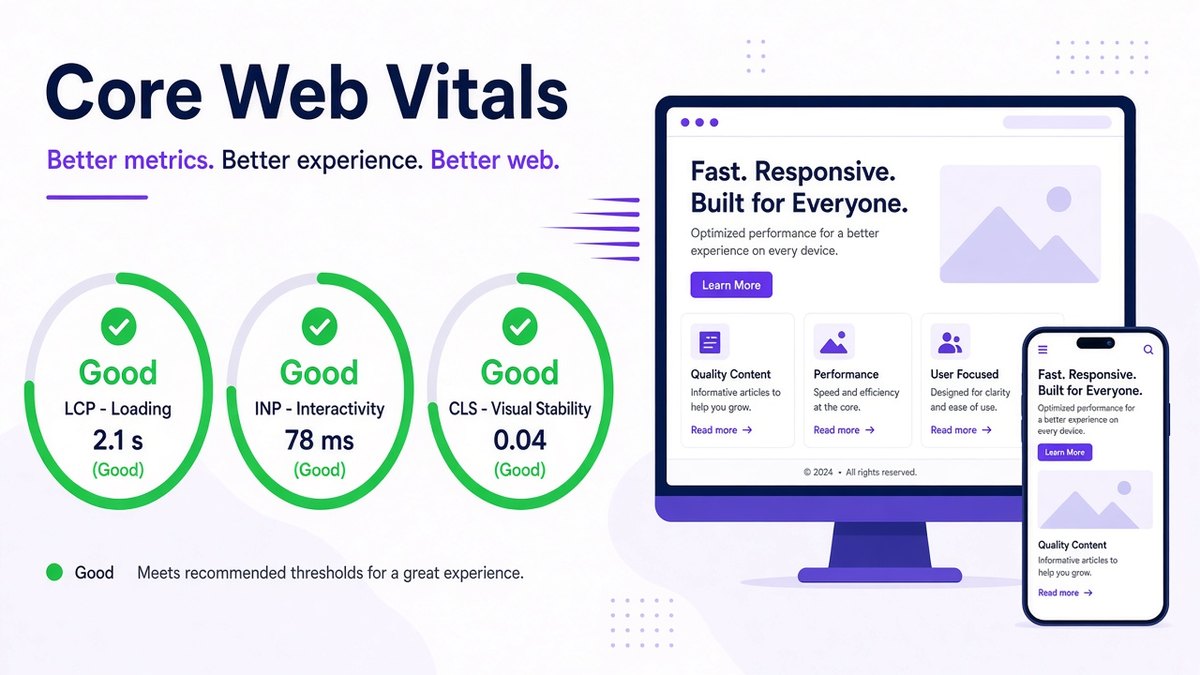
Core Web Vitals are Google’s measures of real-world page experience. In March 2024, Interaction to Next Paint (INP) replaced First Input Delay as the responsiveness metric. You can check your scores for free in PageSpeed Insights.
| Metric | What it measures | Good score | Common fix |
|---|---|---|---|
| LCP (Largest Contentful Paint) | Loading speed of the main content | 2.5 s or less | Compress the hero image, use caching and a faster host |
| INP (Interaction to Next Paint) | How fast the page reacts to taps and clicks | 200 ms or less | Remove heavy scripts and unused plugins |
| CLS (Cumulative Layout Shift) | Visual stability while loading | 0.1 or less | Set width and height on images, ads and embeds |
💡 Fast wins for WordPress
Enable a caching plugin, serve images in WebP, lazy-load images below the fold and remove plugins you no longer use. Together, these often move a slow site into the green.
Step 6: Get on-page basics right
With the technical base in place, turn to each page. On-page SEO tells Google exactly what a page covers and helps it earn the click.
- Title tag: include the main keyword near the start and keep it under about 60 characters.
- Meta description: write a clear, 140 to 160 character summary that invites the click.
- One H1 per page: use H2 and H3 headings in a logical order, like a table of contents.
- Answer early: put the direct answer in the first paragraph or two, then expand.
- Unique content: every page needs its own purpose. Merge near-duplicate pages instead of keeping both.
Step 7: Build internal links and breadcrumbs
Internal links are links from one page on your site to another. They help Google discover pages. They also show which pages matter most. Furthermore, they keep readers moving to related content, such as my guide to avoiding common e-commerce SEO mistakes.
For this reason, use descriptive anchor text rather than “click here”. Similarly, link from strong, older posts to newer ones that need a push. In addition, add breadcrumbs. Yoast can output breadcrumbs with matching schema, which also shows a clean path in search results.
📌 Orphan pages
We call a page with no internal links pointing to it an orphan. As a result, crawlers struggle to find it, so make sure every important page has at least two or three internal links.
Step 8: Optimise every image
Images make content clearer, yet they are often the heaviest part of a page. Resize them to the display width before upload, compress them and use modern formats like WebP. As a result, pages load faster on mobile data.
Next, write alt text for every meaningful image. Describe what the image actually shows, in a natural sentence. In this way, you help visually impaired visitors and also help Google understand the image. My post on visual content in marketing explains why good images also improve engagement.
Step 9: Add structured data
Structured data, or schema markup, is code that labels your content for search engines. For example, it can say “this is an article, written by this person, published on this date”. Consequently, Google understands the page with less guesswork.
On WordPress, Yoast adds Article, Organization and Breadcrumb schema automatically. You can also add Product, Review, LocalBusiness or FAQ markup where it truly fits. Afterwards, test your pages with Google’s Rich Results Test.
⚠️ Be realistic about rich results
Schema helps understanding, but it does not guarantee special snippets. For instance, Google now shows FAQ rich results mainly for well-known government and health sites.
Step 10: Help Google crawl and index
The last step connects your SEO-friendly website to Google. First, verify the site in Google Search Console. Then, submit your XML sitemap, which Yoast creates at /sitemap_index.xml.
After that, check your robots.txt file. Above all, it should not block important folders, CSS or JavaScript. Also, make sure staging or test pages use a noindex tag, while live pages do not.
Finally, use canonical tags to point duplicate versions to one main URL. Then, watch the Page indexing report every week after launch. It lists which pages Google has indexed and explains why others are missing.
To keep an eye on all of this without manual checks, a site audit tool helps. SE Ranking runs scheduled audits that flag broken links, slow pages, missing tags and redirect chains. Plus, it tracks your rankings in the same dashboard.
Audit your website in minutes
Run an SE Ranking site audit to find technical SEO issues before they cost you traffic.
Affiliate link. I may earn a commission at no extra cost to you.
SEO-friendly website launch checklist
Use this checklist whenever you launch a new site or redesign an old one. Tick each item off, and you will avoid the problems that hold most small sites back.
| Area | Check | Done? |
|---|---|---|
| Structure | Every key page within three clicks; clear categories | ☐ |
| Security | HTTPS on all pages; HTTP redirects with 301 | ☐ |
| URLs | Post-name permalinks; short, lowercase, hyphenated | ☐ |
| Mobile | Responsive layout; readable text; no blocking pop-ups | ☐ |
| Speed | LCP, INP and CLS green in PageSpeed Insights | ☐ |
| On-page | Unique title, meta description and one H1 per page | ☐ |
| Links | No orphan pages; descriptive anchor text; breadcrumbs | ☐ |
| Images | Compressed WebP or JPG; descriptive alt text | ☐ |
| Schema | Article and breadcrumb schema valid in Rich Results Test | ☐ |
| Indexing | Sitemap submitted; robots.txt clean; no stray noindex | ☐ |
Once the foundation is solid, you can focus on growth. My advanced guide to ranking higher on Google covers topic clusters, content refreshes and link earning. You might also like how to make an interactive website for ideas that keep visitors engaged.
Frequently Asked Questions
What makes a website SEO-friendly?
An SEO-friendly website is easy to crawl, fast, secure, mobile-friendly and clearly structured. Each page has a unique title, a logical heading order, descriptive URLs and helpful content.
Is WordPress good for SEO?
Yes. WordPress gives you full control over titles, URLs, redirects, sitemaps and schema, especially with a plugin like Yoast SEO and a lightweight theme.
What are good Core Web Vitals scores?
Aim for Largest Contentful Paint of 2.5 seconds or less. In addition, keep Interaction to Next Paint at 200 milliseconds or less and Cumulative Layout Shift at 0.1 or less.
Do I need schema markup?
Schema is optional. Even so, it helps search engines understand your pages. WordPress SEO plugins add basic Article and Breadcrumb schema automatically.
How do I know if Google has indexed my site?
Open the Page indexing report in Google Search Console, or inspect a single URL with the URL Inspection tool. Both tell you whether Google has indexed a page and why.
Final thoughts
Building an SEO-friendly website is not about tricks. Instead, it is about removing every obstacle between your content and the people searching for it. Plan the structure, choose fast hosting, design for mobile, hit Core Web Vitals and help Google index your pages.
Do these ten steps once and do them well. After that, every new article you publish starts with a real advantage.
Affiliate disclosure: Some links in this post are affiliate links. If you buy through them, I may earn a commission at no extra cost to you.